
- Created by Silvan Frey on Jul 15, 2026 2 minute read
You have English selected as language but this page has not been translated yet. Translate the page or view the content in the default space language below.
Display defaultDocument Version
Overview
The VicSDK allows every Swiss citizen to share data securely with medical persons using their iPhone. This page and the pages linked on it, describe the setup of version 3.0.0 and onwards. For setup of older versions, follow the PDF guides for these specific versions. As users are used to access all services using their mobile phone, they expect to be able to do the same within medical processes. Additionally, some digital services cannot be accessed using a smart-card because of technical limitations. This SDK provides a useful alternative for users who do not want to carry a physical card and opens the door to new processes.
Versioning
The minimum build requirements are:
| VicSwift 2.6.11 | VicSDK 3.x.x | |
|---|---|---|
| iOS Deployment Target | 15.0 | 15.6 |
| Swift Language Version | 5.0 | 5.0 |
| Xcode Version | 18.5 | 26.x |
- ✅ All dependencies embedded (no additional setup needed)
- ✅ Available via Swift Package Manager and CocoaPods
What's Embedded
This XCFramework includes all dependencies statically linked:
- Paseto (token handling)
- Sodium (cryptography)
- CryptoSwift (additional crypto functions)
- TypedJSON (JSON utilities)
- Clibsodium (cryptography)
Key Features
- Looks the same for all insurances, to reduce confusion at medical care providers
- Add several insurance cards, according to the family structure of your insurance
- Check-in at a medical care provider with the use of a printed QR code
- Receive a strong verification from a medical person or an insurance
- Use this verification in other medical processes and web portals
- Customize colors and fonts to match your insurance branding
 Virtual Insurance Card Screens and Tutorials
Project Setup
Setup via SPM (Swift Package Manager)
Add to your Package.swift:
dependencies: [
    .package(url: "https://dev.azure.com/SASISAG/VICSDK/_git/VicSdkiOS", from: "3.0.0")
]
Or use the Xcode SPM Browser to add the VicSDK Package.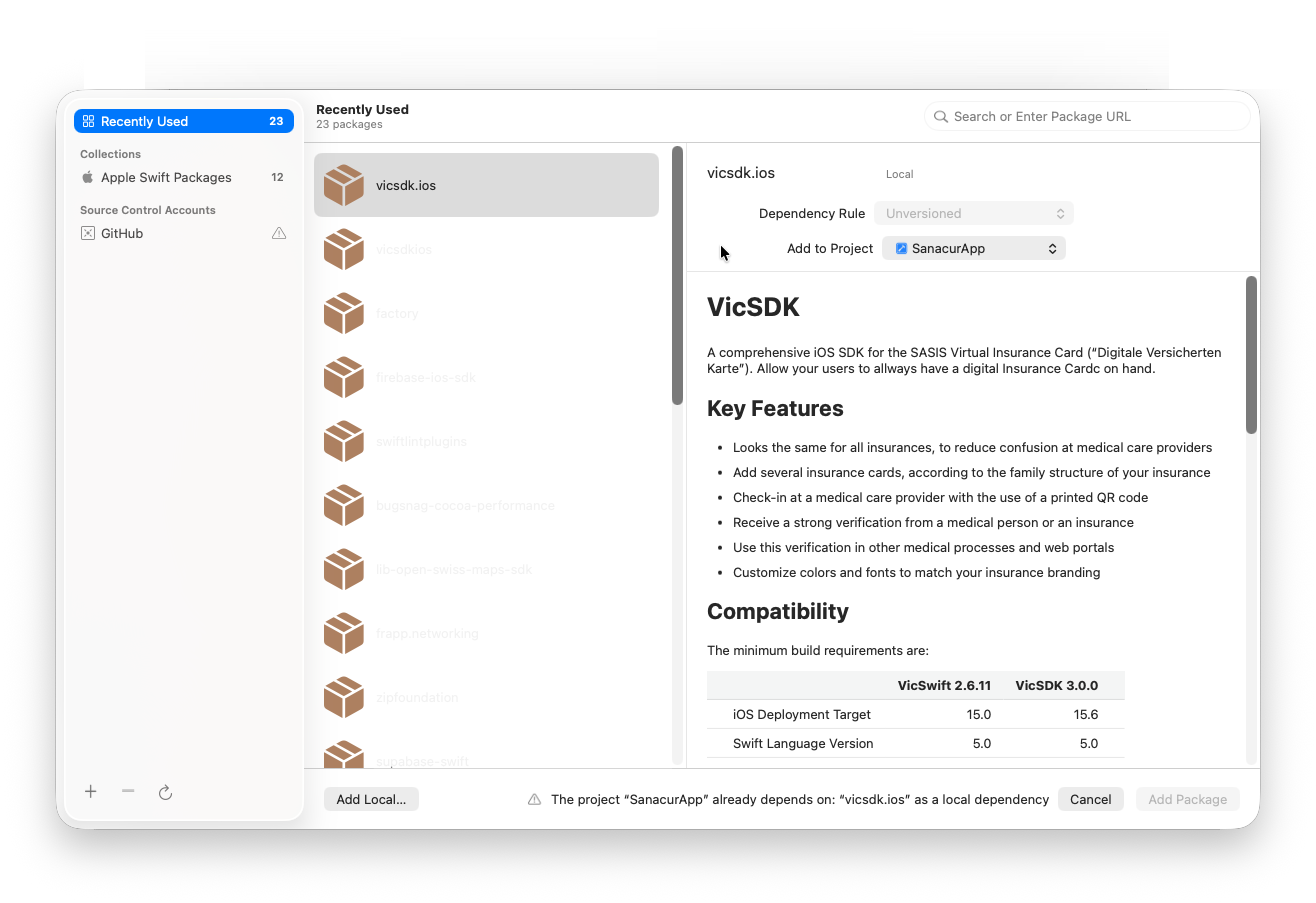
Setup of a local SPM Source
If the remote repository cannot be added for some reason via Xcode, follow these instructions to add VicSDK to your project.
- Download the package to a local path, we recommend to use a folder name with the current VicSDK Version.
- Make sure the folder contains the root level of the VicSDK Repository with the Files
Package.swiftandVicSDK.xcframework.
- Make sure the folder contains the root level of the VicSDK Repository with the Files
- In Xcode go to Project → Package Dependencies → Click on + (Add Package Dependency) → Add Local... → Select previously created Folder with
VicSDK.xcframework.
Setup via CocoaPods
Add to your Podfile:
pod 'VicSDK',
    :git => 'https://dev.azure.com/SASISAG/VICSDK/_git/VicSdkiOS',
    :tag => '3.0.0'
Integration
Project Configuration
VicSDK requires following Info.plist Keys to function as intended.
<key>NSCameraUsageDescription</key>
<string>YOUR_CUSTOM_REASON_TO_ACCESS_CAMERA</string>
<key>NFCReaderUsageDescription</key>
<string>YOUR_CUSTOM_REASON_FOR_READING_NFC_TAGS</string>
Key | Verwendungszweck in VicSDK |
|---|---|
NSCameraUsageDescription | Wird für das Checkin via QR Code verwendet |
NFCReaderUsageDescription | Wird für das Checkin via NFC Tag verwendet |
VicSDK Configuration
Configuration should happen early in Application lifecycle. We recommend adding the functionality to configure VicSDK to your AppDelegate.
import Foundation
import VicSDK

class AppDelegate: NSObject, UIApplicationDelegate {
  func application(_ application: UIApplication, didFinishLaunchingWithOptions launchOptions: [UIApplication.LaunchOptionsKey: Any]? = nil) -> Bool {
    // configure early in Application lifecycle
    configureVicSDK()
	return true
  }
}

private func configureVicSDK() {
  // Define VicSettings
  VicSettings.Icon.info.color = UIColor(named: "MY_COLOR")
  VicSettings.Typography.FontFamily.regular = MyCustomFonts.regular
  VicSettings.Typography.TextStyle.pageTitle.size = MyCustomTextStyles.pageTitle.size

  let image = UIImage(named: "YOUR_CARD_DESIGN")
  VicSettings.Card.setImage(image: image)

  // omit passConfig if no wallet functionality wanted
  VicSettings.passConfig = PassConfig(iconImage: UIImage.passIcon,
                                            logoImage: UIImage.sanacurLogoDummy,
                                            foregroundColor: "#000000",
                                            backgroundColor: "#FFFFFF",
                                            labelColor: "#000000")
}
VicSDK Card Presentation Flow![]()

The original mermaid diagram can be found here.
Prepare VicSDK
Before showing the user’s cards, the insurer application needs to fetch the user’s VekaNr claims from the insurer backend service and pass them to the VicSDK. The Insurer backend expects a public key which is provided by VicCardsSDK.getUserPublicKey() funtion.
The list of VekaNr claim has to be provided as a JSON array of public PASETOs v2, with one PASETO corresponding to one VekaNr claim. This enables the VicSDK to authenticate to the SASIS server and fetch the data of all the cards.
After fetching the VekaNr claims, pass them to the VicCardsSdk by calling the VicCardsSdk.setVekaNrClaims() function.
guard let publicKey: String = VicCardsSdk.getUserPublicKey() else {
  logger.error("❌ no public key")
  return
}

guard let claims: [String] = try? await MyInsurerBackend.fetchVekaNrClaims(publicKey) else {
  logger.error("❌ no claims returned")
  return
}

VicCardsSdk.setVekaNrClaims(claims: claims)
Present Cards
The cards of all the family members can be shown by the VicSDK. These can then be used to scan a QR code and transmit a signed/verified version of the card to a third party such as a hospital.
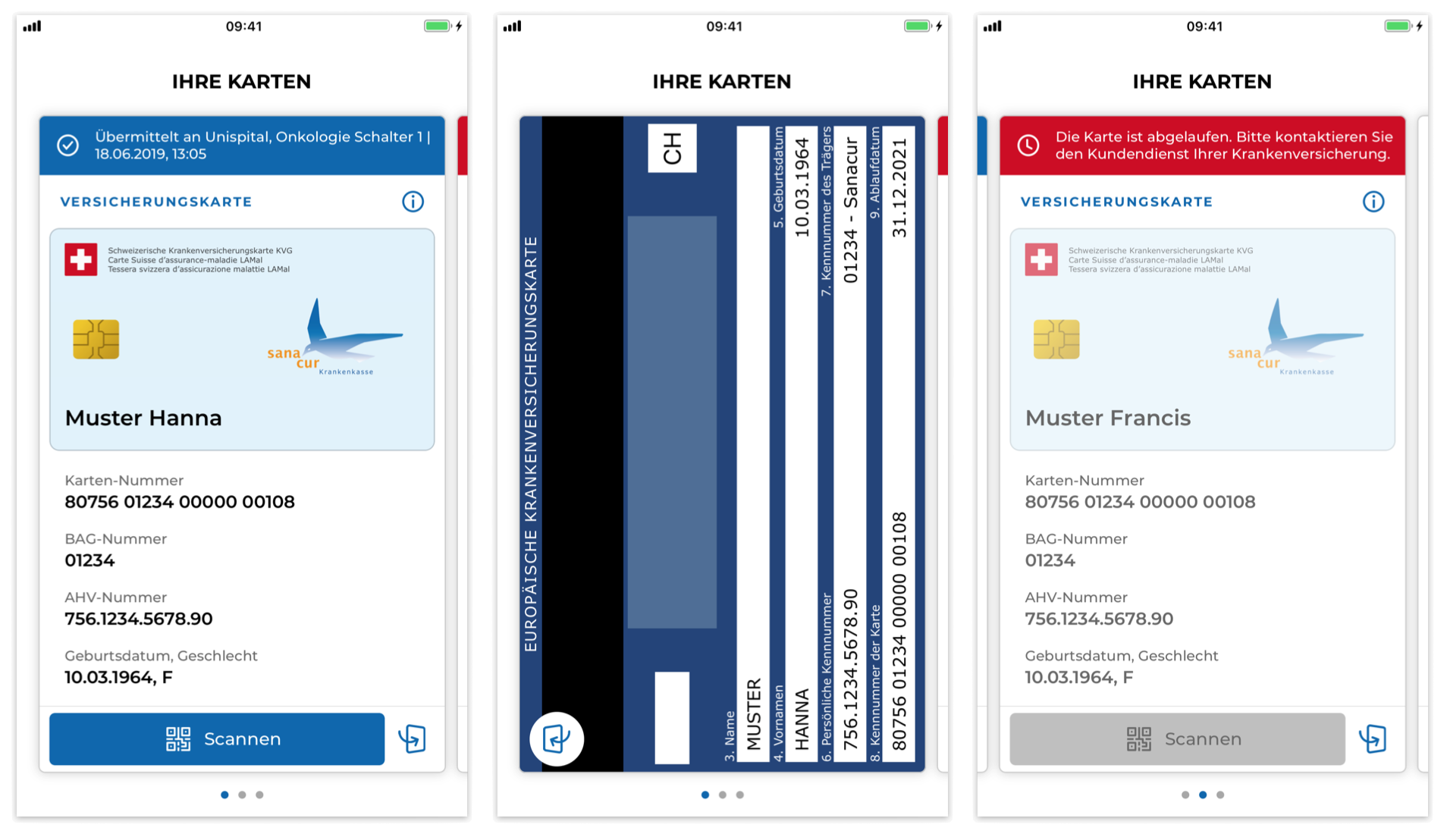 Virtual Insurance Card front-, backside and invalid card
VicSDK in UIKit Apps
Present the VicCardViewController as a child ViewController.
private var vicRequestUrl: String? = nil


override func viewDidLayoutSubviews() {
    if (YOUR_CARD_VIEW.subviews.isEmpty) {
        self.addVicCardsSubview()
    }
}

func addVicCardsSubview(hideTutorialScreens: Bool, listItemOrder: [VicSDK.VicCardListItem]) {
    let cardViewController = VicCardViewController(requestUrl: vicRequestUrl)
	cardViewController.view.frame = cardView.layer.bounds
    cardViewController.isScrollEnabled = false // use Buttons instead of swipe gesture
    cardViewController.hideTutorialScreen(hideTutorialScreens)
    cardViewController.defineCardListItemOrder(listItemOrder)
    addChild(cardViewController)
    YOUR_CARD_VIEW.addSubview(cardViewController.view)
}
VicSDK in SwiftUI Apps
Create a UIViewRepresentable to create a View that can be presented in a SwiftUI Application.
import Foundation
import SwiftUI
import VicSDK

struct VicCardsView: UIViewControllerRepresentable {
    var requestURL: String?
	var hideTutorialScreens: Bool
	var listItemOrder: [VicSDK.VicCardListItem]

    func makeUIViewController(context: Context) -> VicCardViewController {
        let cardViewController = VicCardViewController(requestUrl: requestURL, delegate: context.coordinator)
		cardViewController.isScrollEnabled = true // use swipe gesture instead of Buttons
    	cardViewController.hideTutorialScreen(hideTutorialScreens)
	    cardViewController.defineCardListItemOrder(listItemOrder)
		return cardViewController
    }

    func updateUIViewController(_ uiViewController: VicCardViewController, context: Context) {
    }

    func makeCoordinator() -> Coordinator {
        Coordinator()
    }
}

final class Coordinator: NSObject, VicCardDelegate {
	func cardsUpdateFinished(errors: [VicSDK.VicError]) {
        // handle card updates here
    }

    func didSelectCardAt(index: Int) {
        // handle custom actions on card selection
    }

    func didSelectCardWith(number: String) {
        // handle custom actions on card selection
    }
}
Handling local cached files in VicSDK
As the cards will be saved offline, you need to call the following function to delete all card data in case of a logout. Make sure Prepare VicCardsSdk is called after user login.
VicCardsSdk.deleteAll()
Universal Links
Universal Links allow the user to scan the check-in QR code provided by health care institutions with VicSDK. Alternatively the user can use the NFC functionality to start the check-in process by simply tapping the top of the phone to where the NFC Tag is located.
Add following Entitlement file to your app and make sure it is assigned to your apps target. This will allow your app to handle NFC Tags and to suggest your app being opened when certain URLs are called. Further send your app ids (in the format of <YOUR_TEAM_IDENTIFIER>.<YOUR_BUNDLE_IDENTIFIER>, e.g. `sampleapp.sasis.ch`) to your contact person from SASIS. We will add your app ids to the `apple-app-site-association` file on the servers. This allows your app to handle the universal links.
<?xml version="1.0" encoding="UTF-8"?>
<!DOCTYPE plist PUBLIC "-//Apple//DTD PLIST 1.0//EN" "http://www.apple.com/DTDs/PropertyList-1.0.dtd">
<plist version="1.0">
<dict>
	<key>com.apple.developer.associated-domains</key>
	<array>
		<string>applinks:vvk-online.ch</string>
		<string>applinks:www.vvk-online.ch</string>
	</array>
	<key>com.apple.developer.nfc.readersession.formats</key>
	<array>
		<string>TAG</string>
	</array>
</dict>
</plist>
Following links provide in depth documentation on Universal links and its requirements.
Team Identifier: https://developer.apple.com/help/glossary/team-id/
Bundle Identifier: https://developer.apple.com/help/glossary/bundle-id/
For UIKit Apps, handle the data received from the universal link or NFC tag in your `UIWindowSceneDelegate`. Change handleVicLink(requestUrl:) to your applications needs.
import UIKit
class SceneDelegate: UIResponder, UIWindowSceneDelegate {

    var window: UIWindow?

    func scene(_ scene: UIScene, willConnectTo session: UISceneSession, options connectionOptions: UIScene.ConnectionOptions) {
        guard let windowScene = scene as? UIWindowScene else { return }
        window = UIWindow(windowScene: windowScene)

        // Handle any user activities passed at launch
        if let userActivity = connectionOptions.userActivities.first {
            handleUserActivity(userActivity)
        }
    }

    func scene(_ scene: UIScene, continue userActivity: NSUserActivity) {
        handleUserActivity(userActivity)
    }

    private func handleUserActivity(_ userActivity: NSUserActivity) {
        guard userActivity.activityType == NSUserActivityTypeBrowsingWeb else {
            return
        }

        if let webPageUrl = userActivity.webpageURL {
            handleVicLink(requestUrl: webPageUrl.absoluteString)
        } else if let ndefRecord = userActivity.ndefMessagePayload.records.first(where: { $0.typeNameFormat != .empty }),
                  let requestURL = String(data: ndefRecord.payload, encoding: .utf8) {
            handleVicLink(requestUrl: requestURL)
        }
    }

    func handleVicLink(requestUrl: String) {
        guard let vc = UIStoryboard(name: "Main", bundle: nil).instantiateViewController(withIdentifier: ApiService.isUserLogged ? NavControllers.myCards : NavControllers.login) as? BaseNavigationController else {
            return
        }
        vc.requestUrl = requestUrl

        window?.rootViewController = vc
        window?.makeKeyAndVisible()
    }
}
The SwiftUI equivalent would look as follows.
import SwiftUI
import VicSDK


@main
struct VicardApp: App {

    @StateObject private var appRouter = AppRouter()

    var body: some Scene {
        WindowGroup {
            RootView()
                .environmentObject(appRouter)

				// Universal Links (https://...)
                .onOpenURL { url in
                    appRouter.handleVicLink(requestUrl: url.absoluteString)
                }

                // Universal Links + NFC (NSUserActivity)
                .onContinueUserActivity(NSUserActivityTypeBrowsingWeb) { userActivity in
                    appRouter.handle(userActivity: userActivity)
                }
        }
    }
}

final class AppRouter: ObservableObject {

    @Published var route: AppRoute = .initial

    func handle(userActivity: NSUserActivity) {
        guard userActivity.activityType == NSUserActivityTypeBrowsingWeb else {
            return
        }

        if let webPageUrl = userActivity.webpageURL {
            handleVicLink(requestUrl: webPageUrl.absoluteString)
            return
        }

        if let ndefRecord = userActivity
            .ndefMessagePayload?
            .records
            .first(where: { $0.typeNameFormat != .empty }),
           let requestURL = String(data: ndefRecord.payload, encoding: .utf8) {
            handleVicLink(requestUrl: requestURL)
        }
    }

    func handleVicLink(requestUrl: String) {
        if ApiService.isUserLogged {
            route = .myCards(requestUrl)
        } else {
            route = .login(requestUrl)
        }
    }
}
Customization
Language
In order to change the language of the VICARD SDK, call the setLanguage method of the VicSettings:
VicSettings.Language.setLanguage(language: VicLang.EN)
The languages supported by the VICARD SDK are: German, English, Italian, French.
Typography
Font Families
In order to customize the font families of the VICARD SDK, change the following settings after initializing the SDK:
VicSettings.Typography.FontFamily.light
VicSettings.Typography.FontFamily.regular
VicSettings.Typography.FontFamily.medium
VicSettings.Typography.FontFamily.semibold
VicSettings.Typography.FontFamily.bold
Text Styles
In order to customize the text styles of the VICARD SDK, change the following settings after initializing the SDK:
VicSettings.Typography.TextStyle.pageTitle
VicSettings.Typography.TextStyle.pageTitleInverted
VicSettings.Typography.TextStyle.subhead
VicSettings.Typography.TextStyle.subheadInverted
VicSettings.Typography.TextStyle.copytext
VicSettings.Typography.TextStyle.copytextInverted
VicSettings.Typography.TextStyle.copytextBold
VicSettings.Typography.TextStyle.copytextBoldInverted
Each typography object can be customized by the following settings:
family: String
size: UInt8
weight: UIFont.Weight
spacing: Float
uppercase: Bool
color: {
    normal: UIColor
    disabled: UIColor
    error: UIColor
}
Buttons
In order to customize the buttons of the VICARD SDK, change the following settings after initializing the SDK:
VicSettings.Button.primary
VicSettings.Button.primaryInverted
VicSettings.Button.secondary
VicSettings.Button.secondaryInverted
Each button object can be customized by the following settings:
text: {
    family: String
    size: UInt8
    weight: UIFont.Weight
    spacing: Float
    uppercase: Bool
    color: {
        normal: UIColor
        disabled: UIColor
        selected: UIColor
    }
}
backgroundColor: {
    normal: UIColor
    disabled: UIColor
    selected: UIColor
}
border: {
    width: UInt8,
    radius: UInt8,
    color: {
        normal: UIColor
        disabled: UIColor
        selected: UIColor
    }
}
iconColor: {
    normal: UIColor
    disabled: UIColor
    selected: UIColor
}
Icons
In order to customize the icons color of the VICARD SDK, change the following settings after initializing the SDK:
VicSettings.Icon.close
VicSettings.Icon.info
VicSettings.Icon.flip
VicSettings.Icon.error
VicSettings.Icon.system
VicSettings.Icon.systemInverted
Each icon object can be customized by the following settings color: UIColor.
Cards
Card Data
On the front card, by default, the following card data attributes are shown in this order:
cardNumber, institutionIdentificationNumber, personalIdentificationNumber, birthDate, policyNumber, expiryDate, barcode, appleWallet
The visibility and order of these attributes can be changed using defineCardListItemOrder(_:):
var listItemOrder: [VicSDK.VicCardListItem]
cardViewController.defineCardListItemOrder(listItemOrder)
Card Appearance
Card appearance is configured via VicCardConfig objects. There are two levels of configuration:
- Type-level defaults —
VicSettings.Card.cardConfigKVGandVicSettings.Card.cardConfigVVGapply to all KVG or VVG cards respectively. - Per-card overrides —
VicSettings.Card.cardConfigs([String: VicCardConfig]) allows overrides keyed by exact card number. Per-card values take precedence over type-level defaults.
VicCardConfig
VicCardConfig bundles all per-card visual settings:
VicCardConfig(
    freeField: String = "",                             // Free field text on the card back side
    isMagneticStripEnabled: Bool = false,               // Show magnetic strip on back side
    showBackSide: Bool = true,                          // Enable flipping to card back side
    cardFrontsideImage: UIImage? = nil,                 // Custom front background image
    cardBacksideImageVVG: UIImage? = nil,               // Custom VVG back background image
    imageTextColors: VicLabelColorState? = nil,         // Primary text color overlay on card image
    imageSecondaryTextColors: VicLabelColorState? = nil // Secondary text color overlay on card image
)
Setting Type-Level Defaults
VicSettings.Card.cardConfigKVG = VicCardConfig(
    showBackSide: true,
    cardFrontsideImage: UIImage(named: "kvg_card_front")
)

VicSettings.Card.cardConfigVVG = VicCardConfig(
    showBackSide: false,
    isMagneticStripEnabled: true,
    cardFrontsideImage: UIImage(named: "vvg_card_front"),
    cardBacksideImageVVG: UIImage(named: "vvg_card_back")
)
Setting Per-Card Overrides
VicSettings.Card.cardConfigs["YOUR_CARD_NUMBER"] = VicCardConfig(
    freeField: "YOUR_FREE_FIELD_TEXT",
    showBackSide: true,
    cardFrontsideImage: UIImage(named: "YOUR_CARD_DESIGN"),
    imageTextColors: VicLabelColorState(normal: .white, disabled: .gray, error: .red),
    imageSecondaryTextColors: VicLabelColorState(color: .purple)
)
Card Style
VicSettings.Card.style (VicCardState) controls the visual style of all card UI elements:
VicSettings.Card.style
├── front (VicCardFrontSideState)
│   ├── title  — VicLabelTextState (family, size, weight, spacing, uppercase, color)
│   ├── label  — VicLabelTextState
│   └── text   — VicLabelTextState
├── backsideVVG (BacksideStateVVG)
│   └── freeField — VicLabelTextState
├── inner (VicCardInnerState)
│   ├── text   — VicLabelTextState
│   └── border — VicCardBorderState (width, radius, color)
├── banner (VicCardBannerState)
│   ├── text            — VicLabelTextState
│   ├── backgroundColor — VicBackgroundColorState (normal, disabled, error)
│   └── iconColor       — VicBackgroundColorState
├── selection (VicCardSelectionState)
│   ├── label — VicLabelTextState
│   └── text  — VicLabelTextState
├── backgroundColor — VicBackgroundColorState (normal, disabled, error)
└── border — VicCardBorderState (width, radius, color)
Deprecated
VicCardState.complementaryBack is deprecated — use VicCardState.backsideVVG instead.VicCardComplementaryBackSideState is deprecated — use BacksideStateVVG instead.
Free Field
Set the free field text via the type-level config:
// KVG default
var kvgConfig = VicSettings.Card.cardConfigKVG
kvgConfig.freeField = "YOUR_MANDATORY_FREE_FIELD_TEXT"
VicSettings.Card.cardConfigKVG = kvgConfig

// VVG default
var vvgConfig = VicSettings.Card.cardConfigVVG
vvgConfig.freeField = "YOUR_COMPLEMENTARY_FREE_FIELD_TEXT"
VicSettings.Card.cardConfigVVG = vvgConfig
VicSettings.Card.cardConfigs["YOUR_CARD_NUMBER"] = VicCardConfig(freeField: "YOUR_FREE_FIELD_TEXT")
Deprecated
VicSettings.Card.freeField (VicCardFreeFieldState) is deprecated — use cardConfigKVG.freeField / cardConfigVVG.freeField directly.VicSettings.Card.setMandatoryFreeField(freeText:cardNumber:) is deprecated — set cardConfigs["YOUR_CARD_NUMBER"]?.freeField instead.VicSettings.Card.getMandatoryFreeField(cardNumber:) is deprecated — read cardConfigs["YOUR_CARD_NUMBER"]?.freeField instead.
Card Background Image
The VicSDK comes with a built-in default background image. To use a custom image, add it to your Xcode assets (e.g. Assets.xcassets). The image must meet the following rules:
- Must be a PNG with the bottom part empty (card-holder info is placed there dynamically)
- Form factor 1:1.73 — e.g. 945 × 546 px
- Logo placed in the right half, horizontally right-aligned and vertically centered; max size 70% width × 60% height of the total image
Set images via VicCardConfig:
// Type-level default
VicSettings.Card.cardConfigKVG = VicCardConfig(cardFrontsideImage: UIImage(named: "kvg_front"))
VicSettings.Card.cardConfigVVG = VicCardConfig(
    cardFrontsideImage: UIImage(named: "vvg_front"),
    cardBacksideImageVVG: UIImage(named: "vvg_back")
)

// Per-card override
VicSettings.Card.cardConfigs["YOUR_CARD_NUMBER"] = VicCardConfig(
    cardFrontsideImage: UIImage(named: "YOUR_FRONT_DESIGN"),
    cardBacksideImageVVG: UIImage(named: "YOUR_BACK_DESIGN")
)
Deprecated
VicSettings.Card.Image enum (.default, .mandatoryFront, .complementaryFront, .complementaryBack) is deprecated.VicSettings.Card.setImage(image:design:cardNumber:) is deprecated — use VicCardConfig.cardFrontsideImage / VicCardConfig.cardBacksideImageVVG via cardConfigKVG, cardConfigVVG, or cardConfigs.VicSettings.Card.getImage(design:cardNumber:) and getImageOrDefault(design:cardNumber:) are deprecated and no longer intended as public API.
Card Image Text Color
Set text color overlays via VicCardConfig:
VicSettings.Card.cardConfigs["YOUR_CARD_NUMBER"] = VicCardConfig(
    imageTextColors: VicLabelColorState(normal: .white, disabled: .gray, error: .red),
    imageSecondaryTextColors: VicLabelColorState(color: .purple)
)
Deprecated
VicSettings.Card.setImageTextColor(color:cardNumber:) and getImageTextColor(cardNumber:) are deprecated — use cardConfigs[cardNumber]?.imageTextColors instead.VicSettings.Card.setImageSecondaryTextColor(color:cardNumber:) and getImageSecondaryTextColor(cardNumber:) are deprecated — use cardConfigs[cardNumber]?.imageSecondaryTextColors instead.
Card Backside visibility
Control whether the card can be flipped via VicCardConfig.showBackSide. Default: true.
// Disable backside for all VVG cards
VicSettings.Card.cardConfigVVG = VicCardConfig(showBackSide: false)

// Or per-card
VicSettings.Card.cardConfigs["YOUR_CARD_NUMBER"] = VicCardConfig(showBackSide: false)
Disabling this also hides the flip button and prevents rotation when tapping the card front.
Deprecated
VicSettings.Card.showComplementaryCardBackside is deprecated — use VicSettings.Card.cardConfigVVG.showBackSide instead.
Card Backside
The European back side of cards can be displayed in English regardless of the app language. Default: false.
VicSettings.Card.enableEnglishEuropeanCard = true
Use Alternative Label for Policy Number
The policy number label defaults to Policy Number To relabel it to Insured Person no.:
VicSettings.Card.useAlternativeLabelForPolicyNumber = true
Hiding Tutorial Screens
Individual tutorial screens can be hidden via hideTutorialScreen(_:) on the card view controller. Available cases in VicTutorialScreen:
| Case | Description |
|---|---|
.welcome | Welcome / intro screen |
.backcard | Back-of-card tutorial |
.barcode | Barcode tutorial |
.nfc | NFC tutorial |
.qrcode | QR code tutorial |
Indicators
In order to customize the indicators of the VICARD SDK, change the following settings after initializing the SDK:
VicSettings.Indicator.loading
VicSettings.Indicator.page
VicSettings.Indicator.scroll
The loading object can be customized by the following settings:
color: UIColor
The page object can be customized by the following settings:
color: {
    normal: UIColor
    active: UIColor
}
The scroll object can be customized by the following settings:
color: UIColor
radius: UInt8
Apple Wallet Pass
Important
If no PassConfig is provided (neither global nor per-card), the Apple Wallet integration remains hidden in the UI.
PassConfig
PassConfig controls the appearance of a Wallet Pass:
PassConfig(
    iconImage: UIImage,                                    // 38×38 points
    logoImage: UIImage,                                    // 160×50 points max
    foregroundColor: String,                               // Hex e.g. "#000000"
    backgroundColor: String,                               // Hex e.g. "#FFFFFF"
    labelColor: String,                                    // Hex e.g. "#000000" — color of the pass title
    barcodeFormat: BarcodeFormat = .pKBarcodeFormatCode128 // optional, defaults to Code128
)
Available BarcodeFormat values: .PKBarcodeFormatQR, .pKBarcodeFormatPDF417, .PKBarcodeFormatAztec, .pKBarcodeFormatCode128
Setting a Global Fallback
VicSettings.passConfig is used as a fallback when no card-specific config is available:
VicSettings.passConfig = PassConfig(
    iconImage: UIImage(named: "wallet_icon")!,
    logoImage: UIImage(named: "wallet_logo")!,
    foregroundColor: "#000000",
    backgroundColor: "#FFFFFF",
    labelColor: "#000000"
)
Setting a Per-Card Config
To customize the pass for a specific card number, use setPassConfig(_:forCardNumber:). This takes precedence over the global fallback:
VicSettings.setPassConfig(
    PassConfig(
        iconImage: UIImage(named: "card_icon")!,
        logoImage: UIImage(named: "card_logo")!,
        foregroundColor: "#FFFFFF",
        backgroundColor: "#003366",
        labelColor: "#CCCCCC",
        barcodeFormat: .PKBarcodeFormatQR
    ),
    forCardNumber: "YOUR_CARD_NUMBER"
)
To read back the resolved config for a card (falls back to global if no per-card config is set):
let config = VicSettings.passConfig(forCardNumber: "YOUR_CARD_NUMBER")
Changelog
3.1.0
- Omit presenting Empty Screen whilst loading passes on first launch
- Renamed mandatory and complementary to KVG and VVG
- Backward compatibility is maintained through deprecations
- Visibility of the magnetic stripe on the back of the card is configurable for KVG and VVG
- Customization of individual VicWalletPasses
3.0.0
- Refactored internal dependency structure
- Refactored internal build and deployment system
- Refactored public facing API
- Removed from public API (VicBarcodeViewController, VicQrViewController, VicCardBarcodeListItemView, VicUtils, VicDefaultSettings)
- Deprecation of (
VicCardsSdk.updateCards(), VicCardsSdk.fetchCards(), VicCardsSdk.getCards()). Use newly available async functions instead.
Added Apple Wallet Pass functionality. Configurable via
VicSettings.passConfig.- Added
VicSDK.doccarchiveCode-Documentation
2.6.11
- [SDSAS-23] Fixed issue with rendering barcodes
2.6.10
- [SDSAS-8] Add the option to use an alternative label for the policy number
2.6.9
- [DEVVEKA-1997] Add leading zero to date of birth with single digit
- [DEVVEKA-1996] Add the insurance number to the frontside of the card
- [DEVVEKA-2276] Fix matching issues with card number for
VicSettings.Card.setMandatoryFreeField - [DEVVEKA-2273] Update minimum SDK to iOS 15
v2.6.8
- Fix SDK compatibility with Xcode 15.0
v2.6.7
- Fix endpoint for DEV environment
v2.6.6
- Fix SDK compatibility with Xcode 14.3
- Add support for Apple Silicon simulators
v2.6.5
- Fix SDK compatibility with Xcode 14.2
- Change SDK distribution format
v2.6.4
- [VIC-1787] Enable card back side in english
- [VIC-1696] Add property to prevent back side on complementary cards
- [VIC-1665] Display BAG number with always 5 digits
- [VIC-1703] Display fullscreen barcode on clicking on the image
- [VIC-1697] Make mandatory card back free field customizable per card number
- [VIC-1750] Make inner card text customizable separately
- Fix SDK compatibility with Xcode 14.1
v2.6.3
- Fix SDK compatibility with Xcode 13.3
v2.6.2
- Fix SDK compatibility with Xcode 13.2
v2.6.1
- [VIC-848] Fix SDK compatibility with Xcode 13
v2.6.0
- [VIC-827] Define mandatory card back style and remove customization
- [VIC-831] Implement long press copy gesture for card data
- [VIC-829] Implement custom card info list order
v2.5.4
- [VIC-840] Make inner card text color customizable
v2.5.3
- Fix SDK compatibility with Xcode 12.5
v2.5.2
- [VIC-815] Fix protection level issue for VicError
v2.5.1
- [VIC-810] Fix crash when loading VicSwift bundle from compiled framework
v2.5.0
- [VIC-802] Implement custom card designs
v2.4.2
- Fix SDK compatibility with Xcode 12.2 and Swift 5.3.1
v2.4.1
- [VIC-796] Fix crash when loading country flag
v2.4.0
- [VIC-795] Fix SDK compatibility with Xcode 12 and following
- [VIC-790] Fix bug when card owner name too long
- [VIC-777] Implement Liechtenstein card handler
- [VIC-787] Make visible tutorial screens configurable
- [VIC-779] deleteAll returns a specific error when no cards are stored
v2.3.2
- [VIC-784] Fix translation on open settings button
v2.3.1
- [VIC-774] Fix crash when scrolling on a device running iOS 12 or lower
v2.3.0
- [VIC-767] Fix color of the free field in the backside of the mandatory card
- [VIC-768] Implement complementary card type
v2.2.0
- [VIC-759] Fix fetchCards: get issuedAt timestamp from backend
v2.1.0
- [VIC-703] Add new tutorial screens for barcode and NFC
v2.0.0
New features
- [VIC-739] Update release notes of SDK
- [VIC-732] New method in the VicCardViewController for scrolling to a specific card by card number **
selectCardWith(number: String) - [VIC-732] New delegate function for getting update about newly selected card number **
didSelectCardWith(number: String) - [VIC-732] New property in the VicCardViewController for retrieving the current selected card number **
currentCardNumber - [VIC-735] New property in the VicCardViewController for enabling/disabled scroll interaction **
isScrollEnabled
Breaking changes
- [VIC-652] Rewrite user customization settings. All possible iOS customizations are now under the
VicSettingsobject. User can now customize even more aspects of the SDK, from background colors, font family/size and so. ** Please be aware that this is a breaking change from the previous version. The new customization settings are fully explained in the documentation, please refer to that to know more.
v1.2.1
Fixes
- [VIC-724] Fix SDK compatibility with Xcode 11.4 and following.
v1.2.0
New features
- [VIC-684] Handle invalid cards coming from the backend. If a card is not valid, a "invalid card" message is shown on top of the card.
v1.1.1
Fixes
- [VIC-715] Fix date format used to create Paseto tokens.
v1.1.0
New features
- [VIC-646] New
fetchCardsmethod to fetch the cards from the SASIS backend and return them to the host application **fetchCards(completionHandler: ([String], [VicError]) -> Void) - [VIC-646] New
decodeAndValidateCardsmethod to decode and validate the cards returned by the SASIS backend **decodeAndValidateCards(cardsData: [String]) -> ([VicCard], [VicError])
v1.0.0
New features
- [VIC-621] Validate claims returned by the SASIS server and return error to the host application if the claim is not valid
- [VIC-624] Update "Universal links" section of SDK documentation
- [VIC-669] Update "NFC tags" section of SDK documentation
- [VIC-664] Add PROD configurations to SDK
Fixes
- [VIC-614] Fix "invalid card" notification message to fit the text in the notification box
- [VIC-658] Fix formatting of AHV number field on the front view of the card
- No labels